Device zero
Your machine is the whole platform: collection, models and case file live on it, and nothing leaves unless you send it.
Engramite and Engramite CLI Are Now Available for macOS.
Our most powerful intelligence platform. Research sources, connect evidence and create reports in one private workspace, powered by on-device AI.
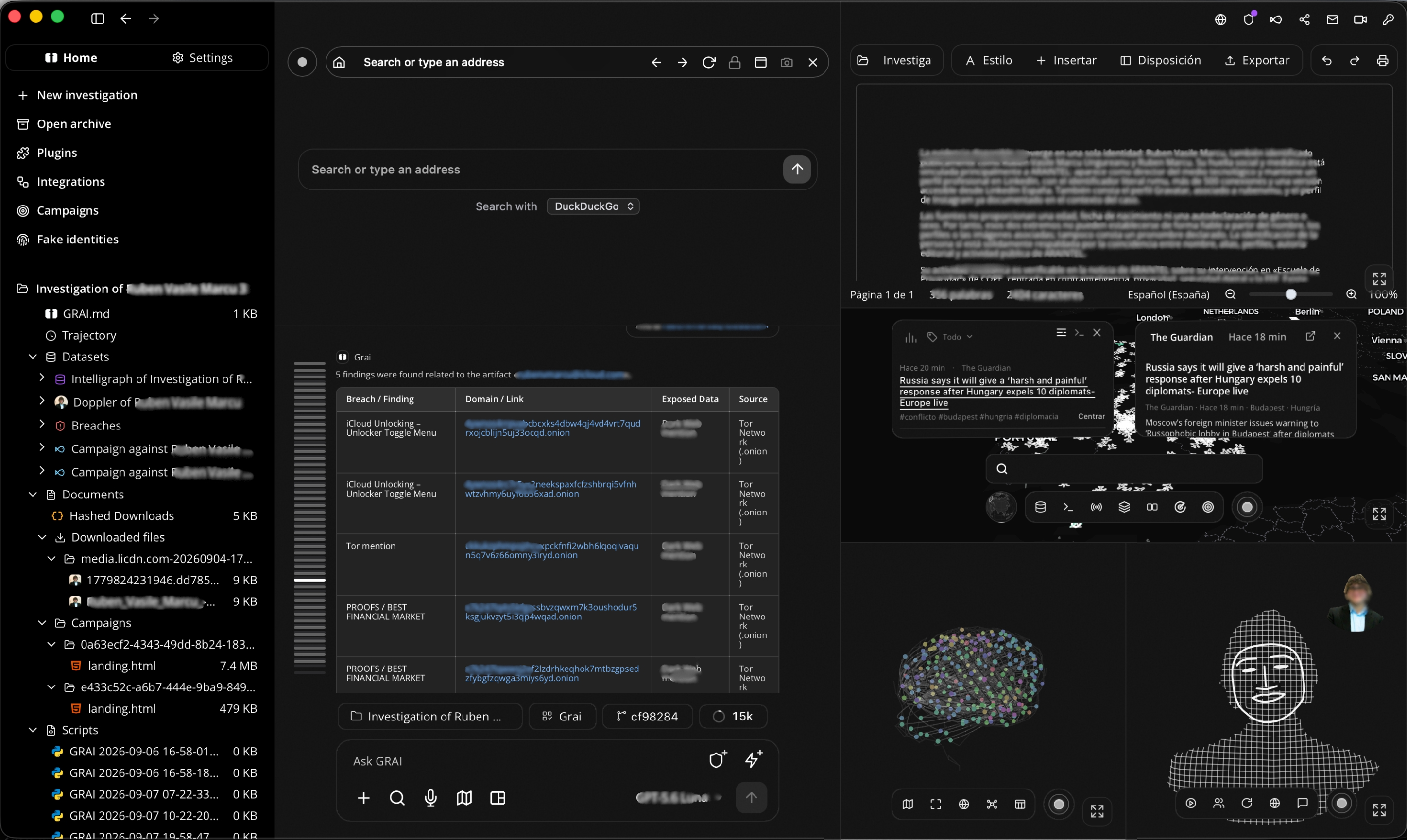
Start with a question, a subject or an asset in scope. Bring documents and existing findings into the case, then use Engramite to collect open-source information, examine imagery and documents, and explore relationships between people, organisations, locations and infrastructure.
Engramite Agent helps coordinate that work. It uses the request and the available case context to select tools and organise multi-step tasks. Collection, link analysis, mapping and report drafting share the same investigation, reducing the need to move material between separate tools or explain the case again.
Follow a lead from a source to an entity, place it on a map or timeline, and compare it with other findings. Review identity matches and supporting sources before drawing conclusions. Assemble the results into a report with references for colleagues, investigators or security assessment clients.
Define the question, the subject or assets in scope, and the result you need.
Bring together documents, source material and earlier findings in one investigation.
Select capabilities for the task, from open-source collection to document and image analysis.
Use relevant case material and conversation summaries to inform the next task.
Interpret the request, select tools and coordinate the work using the available case context.
Organise related tasks into steps and follow their progress as results come back.
Choose manual, supervised or automatic operation to set how tool confirmations are handled.
Search sources, examine documents and imagery, and explore entities and infrastructure.
Use generated scripts for calculations and data processing within the investigation.
Bring extracted data, calculations and generated files into the case for further analysis.
Compare identity matches, source references and claims to assess what supports a finding.
Distinguish accepted findings from uncertain or rejected material during evidence review.
Connect evidence records to subjects, sources and review decisions for later inspection.
Prepare a report with findings and references for investigative or security assessment work.
Stop scattering the investigation across tools: open-source collection, document and image analysis, link analysis and maps all live in one case. Sources and findings sit together, so you explore connections between people, organisations and infrastructure without moving between disconnected products.
Automate the routine work with Engramite Agent: state an objective and it reads the case, picks the tools and organises the multi-step research and analysis. Confirmation controls are configurable, so you decide how much runs on its own and how much waits for you.
Traceability is kept as you go, not reconstructed afterwards. Every finding is reviewed alongside its source, identity matches are assessed and accepted evidence stays separate from uncertain material — and the report is built from that same case, references included.
Ask questions about material already gathered, follow a new lead or pick up an earlier task. The agent uses the case context to connect the request with the work in progress, so nothing has to be explained twice.
Choose manual, supervised or automatic operation. Confirmation settings decide how closely each proposed tool action is reviewed, so you set how much runs on its own and how much waits for you.
Identity resolution, research planning, likeness, psychological and demographic analysis, timelines, scripted runtime and workspace control. Only the capabilities a task actually needs are put in front of the agent.
Open-source collection, image forensics and geolocation, dark web sources over Tor, a local breached-credential index, device and traffic probing, forecasting, situational awareness, due diligence, erasure requests, cover identities and campaigns.
Link analysis and timeline, entity resolution, a geospatial workspace, report drafting inside the case, the case file itself and the same case from a console. Different views, one investigation underneath.
Desktop, terminal and browser run the same investigation. One licence, one session, one case file — move between them without exporting, re-importing or setting the context again.